
If you’ve ever been frustrated by expensive cable bills or weak TV reception, a DIY TV antenna might be exactly what you need. I know how satisfying it feels to build something yourself that actually works, and I’m excited to show you that creating your own TV antenna is easier than you might think. Whether I want to save money, enjoy free over-the-air channels, or simply try a fun weekend project, making a DIY TV antenna can be a rewarding experience.
In this guide, I’ll walk you through everything I need to know, from choosing the right materials to building and positioning the antenna for the best possible signal. By the end, I’ll have the knowledge and confidence to create an affordable TV antenna that helps me enjoy local channels without paying monthly subscription fees.
DIY TV Antenna at a Glance
| Question | Quick answer |
| Can you make a TV antenna yourself? | Yes, for suitable over-the-air broadcast signals. |
| What is the easiest design? | A simple wire/dipole-style antenna is a good starting experiment. |
| What is a better DIY design for UHF? | A bow-tie antenna offers a more directional option. |
| Do you need an amplifier? | Not necessarily. An amplifier cannot create a missing signal. |
| Does a DIY antenna receive digital TV? | Yes. The antenna receives radio-frequency broadcasts; the TV tuner handles the digital signal. |
| Does every homemade antenna work everywhere? | No. Reception depends heavily on location and frequency. |
| Should the antenna be indoors? | It can be, but higher or outdoor placement may improve reception. |
| Do you need to rescan the TV? | Yes, especially after changing the antenna position or connection. |
A useful rule is:
Build the simplest antenna that matches the signals available in your area, then spend time optimizing its position before making the design more complicated.
Before You Build: Check Whether a DIY TV Antenna Can Work
Before cutting wire or drilling holes, determine whether your location has usable terrestrial TV signals.
This prevents a common DIY mistake: spending time building an antenna when the real problem is weak or obstructed reception.
Find the Broadcast Stations Near You
Start by finding out which over-the-air television stations are available in your area.
In the United States, the FCC’s DTV Reception Maps can be used to check predicted broadcast signals. The FCC cautions that these predictions are not a guarantee of indoor reception because the maps use assumptions that can differ considerably from an actual home environment.
If you live elsewhere, use your country’s terrestrial television listings, broadcaster information, or a local reception map.
The important information to collect is:
- Which stations you want
- Their approximate broadcast direction
- Their RF frequency or channel
- Whether they use VHF or UHF
- Whether the signals are relatively strong or weak at your location
Check Whether You Need VHF, UHF, or Both
This is one of the most important parts of choosing an antenna.
Television broadcasts occupy different frequency ranges. A design that performs well for UHF is not automatically the best choice for VHF.
The FCC notes that VHF/UHF reception requires suitable antenna elements and warns that some antennas marketed as HDTV antennas may perform poorly on VHF.
In practical terms:
- VHF elements are generally longer.
- UHF elements can be considerably shorter.
- A compact bow-tie design is particularly associated with UHF reception.
- If important stations use both VHF and UHF, a single-purpose UHF design may not give you the results you want.
Don’t choose an antenna simply because a product or tutorial calls it a “digital” or “HD” antenna. Digital television is a transmission format; the antenna still has to interact with the actual RF frequencies being broadcast.
Find the Approximate Direction of the Stations
If most of the stations you want are coming from the same general direction, a directional DIY antenna can be useful.
If stations are spread around your location, you may need to compromise between directions or consider a design with broader coverage.
This is why antenna placement should be treated as part of the design rather than an afterthought.
Understand Your Building
Indoor reception can be affected by:
- Reinforced concrete
- Metal structures
- Metal roofing
- Foil-backed insulation
- Thick exterior walls
- Nearby buildings
- Trees
- Large appliances and electronic equipment
- The position of the antenna inside the room
A location that looks ideal from inside the room may not be ideal for RF reception.
Which DIY TV Antenna Should You Build?
Don’t automatically build the most complicated design.
Choose according to your situation.
| Situation | Good starting point |
| You want a quick experiment | Simple wire antenna |
| You have reasonably strong nearby stations | Simple indoor antenna |
| Your desired stations are primarily UHF | Bow-tie antenna |
| You want more directional reception | Multi-element bow-tie |
| You need both VHF and UHF | Broad-band design |
| Indoor reception is unreliable | Try a higher location or attic/outdoor setup |
| Stations are weak or distant | A larger directional antenna may be more appropriate |
| You need a permanent installation | Consider a properly installed outdoor antenna |
For a first project, the goal is not maximum theoretical gain.
The goal is to create a working, measurable antenna that you can adjust easily.
Materials and Tools
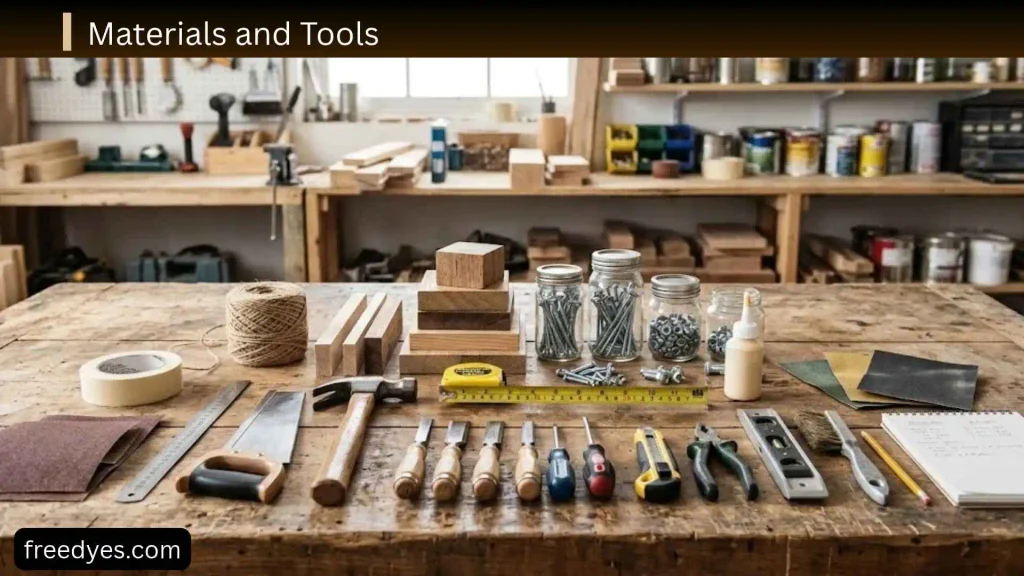
The exact materials depend on the design, but most homemade TV antennas can be made with inexpensive items.
Materials for a Simple Wire Antenna
You may need:
- A length of conductive wire
- 75-ohm coaxial cable
- A suitable connector or adapter
- Nonconductive support material
- Tape, cable ties, or screws for mounting
For some antenna arrangements, a matching transformer or balun may be required.
Materials for a Bow-Tie Antenna
A basic bow-tie design can use:
- Conductive wire or metal elements
- A nonconductive board
- Screws and washers
- 75-ohm coaxial cable
- A suitable 300-to-75-ohm matching transformer where the design calls for it
- Optional reflector material
- Mounting hardware
Useful Tools
Keep these nearby:
- Measuring tape or ruler
- Wire cutters
- Pliers
- Screwdriver
- Drill if needed
- Marker
- Electrical tape
- Cable clips or ties
The important thing is not to make the project unnecessarily complicated.
How to Make a Simple DIY TV Antenna With Wire
A simple wire antenna is one of the easiest ways to experiment with terrestrial TV reception.
It is especially useful when you want to determine whether a homemade antenna can receive usable signals before investing more time in a larger design.
Step 1: Choose the Frequency You Want to Target
Antenna dimensions are related to wavelength, so there is no universally correct wire length for every television station.
A useful starting relationship for a half-wave dipole is:
Total length ≈ 143 ÷ frequency in MHz meters
or approximately:
Total length ≈ 468 ÷ frequency in MHz feet
This is a starting calculation rather than a guarantee of perfect performance. Real antennas have physical construction effects, nearby objects, bandwidth requirements, and matching considerations.
For a dipole-style arrangement, the total element is divided into two sides.
For example, if your starting calculation produces a total length of approximately 1 meter, each side would begin at roughly 0.5 meter.
If you need to cover a broad range of TV frequencies, a single calculated length may not perform equally well across the entire band.
Step 2: Cut the Wire
Measure the wire carefully.
Make each side of the dipole approximately equal.
Avoid leaving unnecessarily long loose sections of wire because the final geometry matters.
Do not worry if the first version is not perfect. The advantage of a DIY antenna is that you can adjust it.
Step 3: Create the Two Antenna Elements
Separate the wire into two electrical elements.
The two sides should be arranged symmetrically.
Keep the active elements away from large metal objects when testing an indoor design.
Step 4: Connect the Feed Point
The feed point is where the antenna connects to the transmission line leading to the TV.
For designs intended to connect a balanced antenna arrangement to 75-ohm coaxial cable, a matching transformer/balun may be appropriate.
The general connection is:
Antenna elements → matching device where required → 75-ohm coax → TV
Don’t assume that every homemade antenna needs exactly the same connection. The feed arrangement depends on the antenna design.
Step 5: Mount the Antenna
For your first test, place it:
- Near a window
- As high as practical
- Away from large electronic devices
- Away from unnecessary metal objects
The FCC recommends experimenting with antenna position, including trying a window location, raising the antenna, changing its direction, and rescanning after moving it.
Step 6: Connect the Coax to the TV
Use suitable 75-ohm coaxial cable.
Check both ends of the cable.
A loose connector can make a perfectly reasonable antenna appear completely useless.
Step 7: Run a Channel Scan
Open your television’s setup menu and look for an option such as:
- Auto Scan
- Channel Scan
- Auto Tuning
- Antenna Scan
- Air Scan
- Terrestrial Scan
The exact name depends on the television.
Choose the antenna/terrestrial option rather than cable if your TV provides a choice.
Allow the scan to finish completely.
How to Build a DIY Bow-Tie TV Antenna
A bow-tie antenna is a more structured DIY option and is particularly useful for UHF-oriented designs.
Instead of one long straight wire, the antenna uses several angled conductive elements arranged in a shape resembling a butterfly or bow tie.
Why Use a Bow-Tie Design?
A bow-tie can provide:
- A more deliberate antenna geometry
- A compact physical shape
- Directional characteristics
- Multiple elements for broader or stronger reception within its intended range
But it still cannot overcome an extremely poor reception environment.
Step 1: Prepare the Backing Board
Use a rigid, nonconductive board large enough to hold the antenna elements.
The board provides physical support.
It does not need to be electrically conductive.
Step 2: Mark the Element Positions
Mark the locations where the bow-tie elements will be mounted.
Keep the left and right sides symmetrical.
If you are building a multi-element version, maintain consistent spacing.
Don’t randomly change the spacing from one element to another. Antenna geometry is part of how the structure behaves electrically.
Step 3: Make the Bow-Tie Elements
Cut matching pieces of conductive wire.
Bend each piece into a V-like shape.
Make the elements as symmetrical as possible.
The exact dimensions should be chosen according to the frequency range you are targeting.
This is important because a bow-tie designed around one portion of the UHF range should not automatically be described as a perfect antenna for every terrestrial TV signal.
Step 4: Attach the Elements
Secure the elements to the board.
Use screws and washers or another method that holds them firmly without creating unintended electrical connections between pieces that should remain separate.
The two sides of each bow tie should maintain the intended gap at the feed point.
Step 5: Connect the Feed
The feed point is the electrical connection between the antenna structure and the coaxial cable.
For many traditional bow-tie constructions, a matching transformer is used to connect the balanced antenna structure to 75-ohm coax.
The basic path is:
Bow-tie elements → matching transformer → 75-ohm coax → television
Follow the connection arrangement appropriate to the specific transformer and antenna design.
Step 6: Add a Reflector if Your Design Uses One
A reflector can be positioned behind the active elements to change the antenna’s directional behavior.
It should not simply be placed against the active elements.
Its spacing and size are part of the antenna design.
If you’re building your first antenna, it’s usually better to get the basic version working before experimenting with reflectors.
Step 7: Test Before Permanently Mounting It
Don’t immediately screw the antenna into its final location.
Connect it temporarily and test:
- Near a window
- Higher in the room
- Facing one direction
- Facing another direction
- With a fresh channel scan after major position changes
Record which location produces the most stable reception.
How to Calculate DIY TV Antenna Length
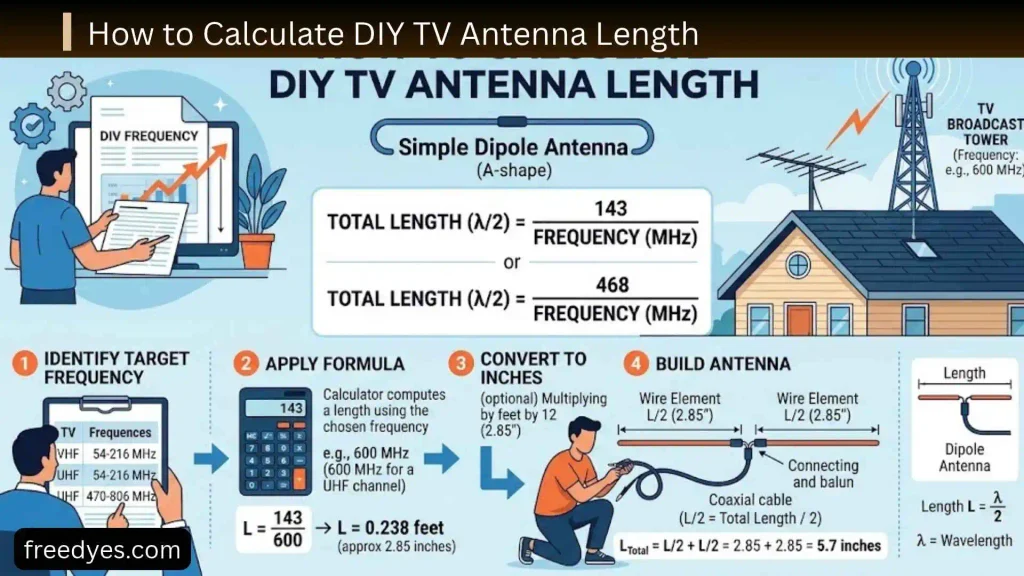
Antenna length is related to wavelength.
The wavelength can be estimated using:
Wavelength in meters ≈ 300 ÷ frequency in MHz
A half-wave element is approximately:
150 ÷ frequency in MHz meters
In practical antenna construction, the final physical length is often somewhat different from the simple theoretical value because of the conductor’s shape, diameter, nearby materials, feed arrangement, and other effects.
That’s why calculated dimensions should be treated as a starting point for construction and adjustment, not a promise of perfect tuning.
Example
Suppose you’re designing a simple dipole around 600 MHz.
A basic half-wave calculation gives:
150 ÷ 600 = 0.25 meters
So the total starting element length would be around 25 cm, with approximately half on each side.
Again, this is a simplified starting point. A real wideband television antenna may use a more complex geometry to cover multiple frequencies.
Why You Shouldn’t Use One Length for Everything
Television broadcasts can occupy a range of frequencies.
A physical element that is a good starting size at one frequency may be a poor match at another.
This is why a wideband TV antenna often looks more complicated than a basic single-frequency dipole.
How to Connect a DIY TV Antenna to Your TV
Most modern televisions designed for terrestrial broadcast reception use a coaxial antenna input.
Look for a connector labeled something like:
- ANT IN
- RF IN
- ANT/CABLE
- AIR/CABLE
Use the appropriate 75-ohm coaxial cable.
Don’t Put Bare Wire Into the TV’s Coax Port
A common DIY mistake is trying to push stripped wire directly into the television’s antenna connector.
Don’t do that.
Use an appropriate connector, adapter, or matching component for the antenna design.
A mechanically convenient connection is not necessarily an electrically appropriate one.
Where Should You Put a DIY TV Antenna?
Placement can matter as much as construction.
A mediocre antenna in a good location can sometimes be more useful than a carefully built antenna trapped behind a large wall or metal object.
Near a Window
A window is a sensible first testing location for an indoor antenna.
The FCC specifically recommends trying a location near a window when reception is poor.
Higher Is Often Worth Testing
Try raising the antenna.
For example:
- On a higher shelf
- Near the upper part of a window
- On an upper floor
- In an attic if appropriate
Don’t assume the highest possible point is automatically best, though. Test it.
Keep It Away From Electronics
Try to keep the antenna away from:
- TVs
- Computers
- Large power supplies
- Other electronic equipment
The FCC also recommends moving an indoor antenna away from electronic equipment when troubleshooting reception.
Attic Placement
An attic can be a useful compromise between indoor and outdoor installation.
However, roof construction and other materials can affect reception.
Metal roofing, foil-backed materials, and other conductive structures can create problems.
Outdoor Placement
Outdoor antennas generally have more freedom to achieve height and a clearer path toward transmitters.
But outdoor installation introduces additional considerations:
- Weather
- Mechanical support
- Cable routing
- Grounding
- Lightning protection
- Electrical safety
- Local building requirements
If installing an antenna on a roof or mast, never work near overhead power lines.
How to Aim a DIY TV Antenna
If your antenna is directional, its orientation can make a significant difference.
Start by identifying the approximate direction of the stations you want.
Then:
- Point the antenna toward that general direction.
- Run a channel scan.
- Record the useful channels.
- Rotate the antenna slightly.
- Scan again.
- Compare the results.
- Repeat until you find a stable position.
Don’t judge the antenna after only one position.
A difference of a small amount in placement or direction can sometimes change reception significantly in a challenging indoor environment.
How to Scan for Free Over-the-Air Channels
Once the antenna is connected:
- Open your TV’s settings.
- Find the channel or broadcasting section.
- Select antenna, air, or terrestrial mode.
- Start an automatic scan.
- Let the television complete the scan.
- Save the results.
- Test the channels you actually want to watch.
If you move the antenna significantly, run another scan.
A TV doesn’t necessarily discover a newly receivable signal simply because you moved the antenna.
How to Test Your DIY TV Antenna Properly
Don’t use channel count alone to judge your antenna.
A better test is:
Test 1: Initial Scan
Record every channel found.
Test 2: Live Stability
Watch your most important channels for several minutes.
Look for:
- Pixelation
- Freezing
- Audio interruptions
- Complete signal loss
Test 3: Move the Antenna
Try several locations.
Test 4: Change Direction
Rotate the antenna and rescan where necessary.
Test 5: Compare Results
Create a simple record:
| Position | Channels found | Important channels stable? | Picture quality |
| Window | — | — | — |
| High shelf | — | — | — |
| Opposite wall | — | — | — |
| Attic | — | — | — |
The best position is not necessarily the one with the largest channel count.
The better position is the one that reliably receives the channels you actually want.
How to Improve DIY TV Antenna Reception
If your antenna works but reception is inconsistent, work through these improvements in order.
1. Reposition the Antenna
This is usually the first thing worth trying.
2. Raise It
Try a higher location.
3. Move It Toward a Window
Especially for indoor installations.
4. Change Its Direction
A directional antenna may need careful aiming.
5. Reduce Unnecessary Cable Length
Longer cable runs introduce more loss.
Don’t use 20 meters of cable when 3 meters will do the job.
6. Check Every Connection
Inspect:
- Antenna feed point
- Matching transformer
- Coax connectors
- TV connector
7. Try Another Cable
A damaged or poorly terminated coax cable can create confusing reception problems.
8. Consider an Attic or Outdoor Location
If the indoor environment is the main obstacle, changing the antenna’s location may be more effective than rebuilding the antenna.
DIY TV Antenna Troubleshooting
| Problem | Possible reason | What to try first |
| No channels found | Poor connection or location | Check coax and move antenna |
| Only a few channels | Frequency or signal limitation | Check VHF/UHF requirements |
| Picture breaks up | Marginal reception | Reposition and re-aim |
| One station is missing | Different frequency or direction | Check that station’s RF details |
| Works near window only | Building attenuation | Keep testing near exterior openings |
| Channels disappear after moving antenna | Position changed reception | Return to the best location and rescan |
| Reception is worse with an amplifier | Overload or poor incoming signal | Remove amplifier and compare |
| Antenna works only in one room | Building structure/interference | Test higher or closer to an exterior wall |
| TV detects channels but picture freezes | Signal quality is marginal | Improve placement before adding equipment |
| No improvement after rebuilding | Location may be the limiting factor | Test a higher or outdoor antenna |
Why Does My DIY Antenna Receive Some Channels but Not Others?
This is one of the most common questions.
Different stations may use different RF frequencies, directions, transmission powers, or polarization/antenna requirements.
Your antenna may therefore receive one station well while struggling with another.
For example, an antenna that performs reasonably well in a UHF-heavy environment may not be equally effective for VHF stations.
The FCC has specifically documented the difficulty some indoor antennas have with VHF reception.
Don’t immediately assume the antenna is defective.
First determine whether the missing station is using a different band.
Why Does My Picture Break Up Instead of Becoming Slightly Worse?
Digital television behaves differently from old analog television.
With an analog signal, reception could gradually become noisy.
With digital television, a marginal signal can remain watchable and then suddenly experience:
- Blocks
- Freezing
- Audio dropouts
- A blank screen
This means a channel that technically appears during a scan isn’t necessarily a reliable channel.
That’s why stability should be part of your antenna test.
Do You Need a TV Antenna Amplifier?
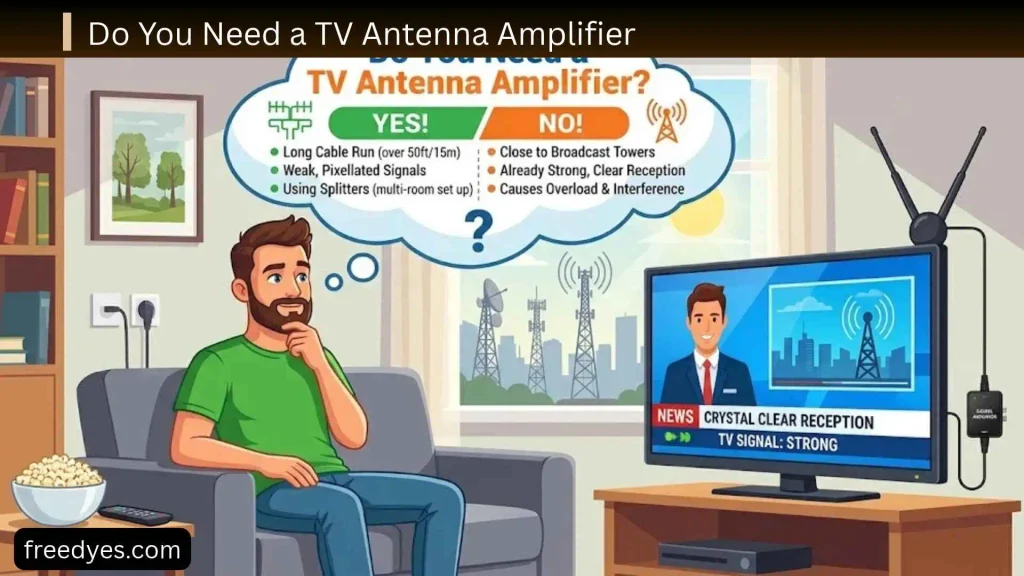
Not automatically.
An amplifier is often misunderstood as a device that makes a bad antenna receive distant stations.
That’s not what it does.
An amplifier increases the level of the signal being delivered through the system.
If the antenna is receiving a very poor signal, an amplifier cannot magically reconstruct information that the antenna never captured.
An Amplifier May Help When
It can be useful in situations involving:
- Long coaxial cable runs
- Signal splitting to several TVs
- A reasonably good incoming signal that loses strength through the distribution system
An Amplifier May Not Help When
The underlying problem is:
- Poor antenna placement
- Severe obstruction
- Incorrect antenna type
- Missing VHF capability
- Bad antenna geometry
- Damaged cable
- Very weak incoming reception
Always optimize the antenna and its location before assuming an amplifier is the solution.
Can One DIY TV Antenna Feed Two TVs?
Yes, but splitting the signal introduces additional loss.
The basic arrangement is:
Antenna → appropriate splitter → TV 1 + TV 2
If reception is already marginal, splitting the signal may make the problem more noticeable.
In that situation, improving antenna placement may be more useful than immediately adding amplification.
DIY TV Antenna vs. Store-Bought Antenna
| Feature | DIY antenna | Commercial antenna |
| Cost | Usually low | Usually higher |
| Customization | High | Limited |
| Learning value | Excellent | Low |
| Construction time | Required | Minimal |
| Appearance | Depends on build | Usually cleaner |
| Performance consistency | Highly location/design dependent | Usually more predictable |
| Weather resistance | Must be designed | Often engineered for outdoor use |
| Easy installation | Depends on design | Usually easier |
| Best for | Experimenting and budget projects | Reliable long-term installation |
A DIY antenna makes sense when you enjoy building things, want to experiment, or need an inexpensive first attempt.
A commercial antenna may make more sense when reception is difficult and reliability matters more than the project itself.
When a DIY TV Antenna Isn’t Enough
There is a point where changing the antenna shape stops being the most useful solution.
Consider a more capable antenna if:
- Your desired stations are weak
- Your home is surrounded by tall buildings
- You are in a difficult terrain area
- Indoor reception is consistently unstable
- Important stations use bands your current design doesn’t cover
- Your antenna works only in a very inconvenient position
- You need dependable reception on multiple televisions
The FCC notes that reception predictions are based on models and that actual reception can differ because of local environmental factors and receiving equipment.
In other words, a bad reception location cannot always be solved by making a more elaborate piece of wire.
Indoor vs. Attic vs. Outdoor DIY TV Antenna
| Location | Advantages | Potential problems |
| Indoor | Cheapest and easiest | Walls and objects can weaken signals |
| Window | Easy to test | Limited placement |
| Attic | Higher and protected from weather | Roof materials may interfere |
| Outdoor | Better height and exposure | Installation and safety become more important |
Start indoors if your signals are strong enough.
Move higher or outdoors if the indoor environment is clearly limiting reception.
DIY TV Antenna Safety
A homemade antenna is generally a low-power receiving device, but installation can still create physical and electrical hazards.
Never Work Near Overhead Power Lines
This is the most important rule for an outdoor installation.
A metal antenna, ladder, mast, or cable can create a serious electrical hazard if it contacts or approaches power lines.
Secure Outdoor Structures
An outdoor antenna must withstand:
- Wind
- Rain
- Movement
- Its own weight
- Cable tension
Do not create a tall unstable structure simply to gain height.
Protect Outdoor Connections
Outdoor coax connections should be protected against moisture using appropriate weatherproofing methods.
Follow Local Requirements
For permanent outdoor installations, follow applicable electrical, structural, grounding, and lightning-protection requirements in your area.
If you are not comfortable working at height or around electrical infrastructure, use a qualified installer.
Common DIY TV Antenna Mistakes
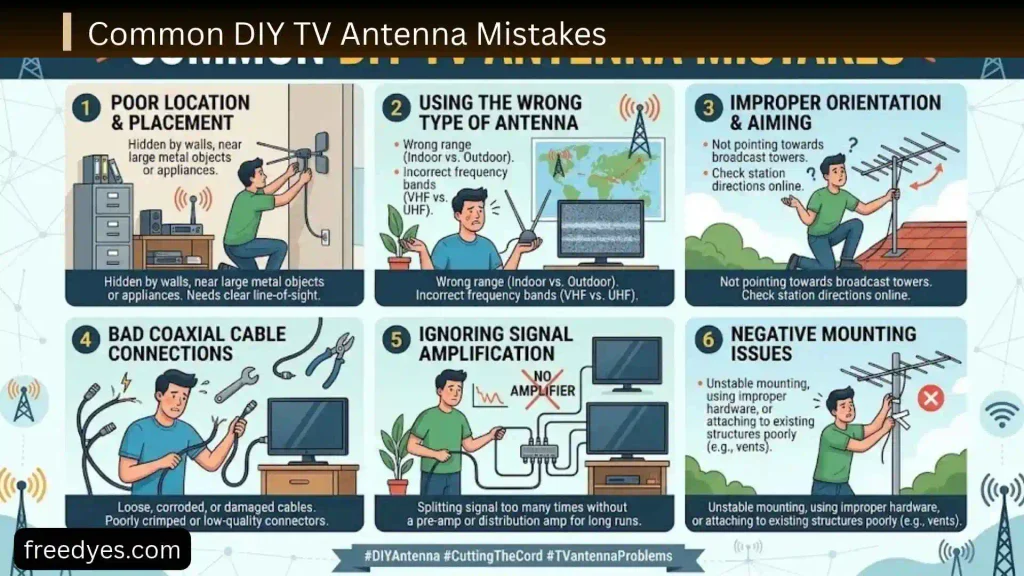
Mistake 1: Building Before Checking Signals
You can build the wrong antenna for your location.
Better: identify the stations and frequency bands first.
Mistake 2: Assuming “Digital” Means One Frequency Range
Digital television can use different RF bands.
Better: check the actual broadcast frequencies.
Mistake 3: Using Random Dimensions
A random piece of wire may work surprisingly well, but it is not a controlled antenna design.
Better: calculate a starting dimension and adjust through testing.
Mistake 4: Ignoring the Feed Connection
A good antenna with a poor feed connection can perform badly.
Better: make the feed point mechanically secure and electrically appropriate.
Mistake 5: Putting the Antenna Behind the TV
The TV itself can be a poor location.
Better: test near a window and higher in the room.
Mistake 6: Assuming More Amplification Is Always Better
An amplifier isn’t a substitute for antenna placement.
Better: fix the antenna and location first.
Mistake 7: Judging Performance by Channel Count Alone
Finding a channel once doesn’t mean the reception is reliable.
Better: test live playback and stability.
Mistake 8: Making the Antenna Too Complicated
More elements don’t automatically mean better reception.
Better: start simple and add complexity only when the test results justify it.
Best DIY TV Antenna by Situation
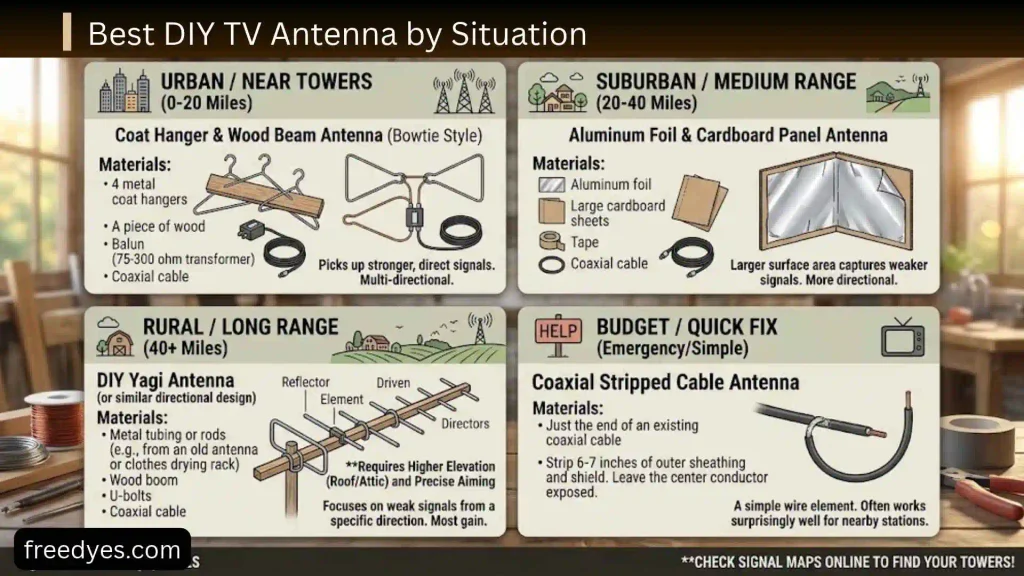
Best for a Quick Experiment
Use a simple wire/dipole-style antenna.
It is inexpensive and lets you determine whether usable reception exists.
Best DIY Choice for UHF
A bow-tie design is a practical starting point when the stations you want are primarily UHF.
Best for More Directional Reception
A multi-element bow-tie can be considered when you need more directional behavior and are willing to spend more time on construction.
Best for Difficult Indoor Reception
Before building a larger antenna, try:
- Window placement
- Higher placement
- Different orientation
- A different room
- Attic placement
If those fail, consider a properly designed outdoor antenna.
Best for a Permanent Setup
If reliability is more important than experimentation, a purpose-built outdoor antenna may be a better choice than a homemade indoor antenna.
How to Make Your DIY TV Antenna More Reliable
The most reliable DIY approach is to treat the project like an experiment.
Start With a Baseline
Build the simplest reasonable design.
Measure Before Changing Everything
Record:
- Antenna dimensions
- Location
- Direction
- Cable length
- Channels received
- Reception problems
Change One Thing at a Time
If you simultaneously change:
- Antenna size
- Cable
- Position
- Direction
- Reflector
- Amplifier
you won’t know what actually improved the result.
Instead:
- Change position.
- Test.
- Record.
- Change direction.
- Test.
- Record.
- Modify the antenna.
- Test again.
This turns random trial-and-error into a useful DIY experiment.
DIY TV Antenna Testing Checklist
Before deciding that your project failed, check:
- Local TV signals are available
- The antenna covers the needed frequency range
- The antenna elements are symmetrical
- The feed connection is secure
- The coax cable is in good condition
- The TV is set to antenna/terrestrial mode
- A fresh channel scan has been completed
- The antenna has been tested near a window
- The antenna has been tested at a higher position
- The antenna has been rotated
- Important channels have been tested for stability
- An amplifier has not been added unnecessarily
- Outdoor installation is safe if applicable
Frequently Asked Questions About DIY TV Antennas
Can I really make a TV antenna at home?
Yes. A simple receiving antenna can be made from conductive materials and connected to a television through an appropriate feed arrangement. Whether it provides useful reception depends on your local broadcast environment.
What is the easiest DIY TV antenna?
A simple wire/dipole-style design is one of the easiest starting points. A bow-tie design is another practical option when UHF reception is the main goal.
Can a DIY antenna receive free TV?
It can receive free over-the-air broadcasts that are available in your area. It does not provide cable channels, satellite programming, or paid streaming services.
Can a homemade antenna receive HD channels?
Yes, provided the antenna and receiving system can adequately capture the relevant broadcast signals. “HD” does not require a special type of radio wave; the antenna still has to work over the frequencies used by the broadcasts.
Do I need a special digital TV antenna?
Not necessarily. The important question is whether the antenna is appropriate for the RF frequencies and signal conditions in your area.
Can I use aluminum foil for a TV antenna?
Conductive foil can be incorporated into some antenna experiments, but simply wrapping foil around a random object does not create a properly designed antenna.
For a repeatable project, use a defined antenna geometry instead.
Can I use a paperclip as a TV antenna?
A paperclip may act as a very small receiving element in some situations, but its size is not appropriate for every TV frequency.
It is better treated as a quick experiment rather than a dependable antenna design.
Why does my DIY antenna work at the window but not inside the room?
The wall, building materials, furniture, electronics, and other objects can alter the signal reaching the antenna.
The FCC specifically recommends trying a window location and moving the antenna higher when indoor reception is poor.
Why does my TV find channels but later lose them?
The detected signals may be marginal.
Try improving antenna placement, direction, height, cable connections, and frequency coverage before adding an amplifier.
How far can a DIY TV antenna receive?
There is no reliable single distance.
Reception depends on transmitter power, terrain, antenna height, frequency, obstructions, antenna design, cable losses, and local interference.
A location with a nearby transmitter can perform poorly indoors, while a carefully positioned antenna may work well farther away.
Should I put my DIY antenna outside?
Only if your reception environment requires it and you can install it safely.
Outdoor placement can improve exposure and height, but outdoor installations require greater attention to mechanical stability, weather, grounding, lightning protection, and electrical safety.
Can I use one antenna for two TVs?
Yes, with an appropriate splitter, but splitting reduces the available signal level. If reception is already marginal, the second television may expose the weakness.
Does a longer coaxial cable reduce reception?
Cable introduces loss, and the amount depends on cable type, length, and frequency.
Use only as much cable as reasonably necessary and avoid damaged or poorly terminated cable.
Final Thoughts
A DIY TV antenna does not have to be complicated.
The smartest way to approach the project is to begin with the signals available at your location rather than copying a random antenna shape.
First determine whether the stations you want are primarily VHF, UHF, or a combination. Then choose a simple design, use sensible dimensions, make the feed connection correctly, and test the antenna in several locations.
For many beginners, a simple wire design is enough to determine whether homemade reception is practical. If you need a more structured UHF-focused design, a bow-tie antenna is a logical next step.
Most importantly, don’t judge the project only by how many channels appear during a scan. Reliable reception of the channels you actually want is the real measure of success.
If the antenna works in one location but not another, keep testing placement before rebuilding everything. And if your location simply has difficult reception, recognize that a homemade antenna may have reached its practical limit.
The goal of a good DIY antenna project isn’t to promise a certain number of channels. It is to build a sensible antenna, understand how it interacts with your local signals, and improve the setup through controlled testing.