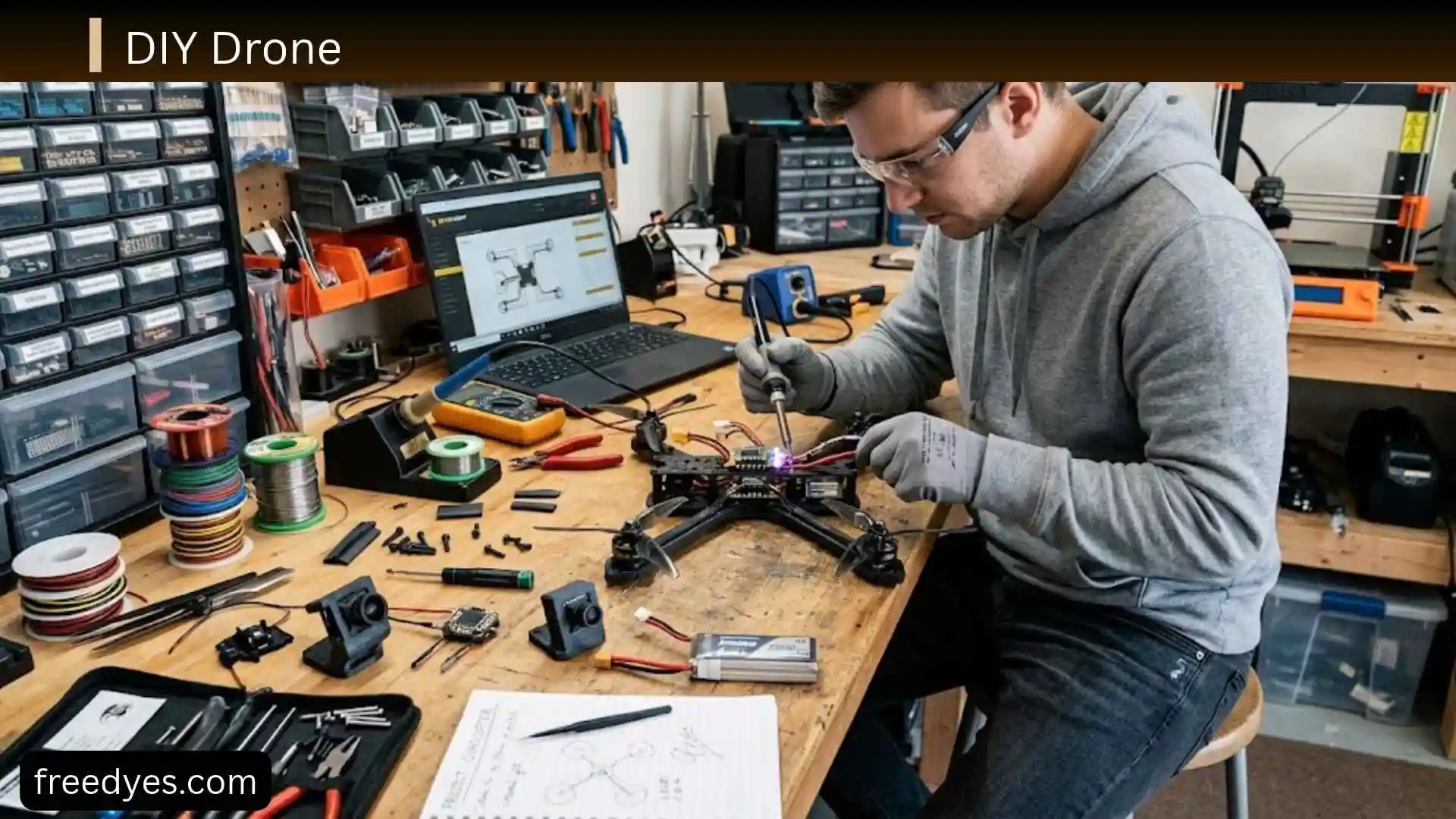
I am always fascinated by the idea of building technology with my own hands, and that’s exactly why a DIY drone is such an exciting project. If you have ever wondered whether you can create a flying drone without spending a fortune, I am here to tell you that the answer is yes. From choosing the right frame and motors to assembling every component, building a DIY drone is a rewarding experience that teaches valuable skills while giving you complete control over the final result.
Whether I am building my first drone for fun, creating an FPV racing drone, or designing a custom aerial photography drone, this guide will help you understand every step in a simple and practical way. You’ll discover the tools, parts, costs, common mistakes, and expert tips needed to build a drone that matches your goals. By the end, I am confident you’ll have the knowledge and confidence to start your own DIY drone project and enjoy the thrill of flying something you built yourself.
What You Will Build
The easiest way to understand a DIY drone is to define the project before choosing individual components.
For this guide, the target is a simple four-motor quadcopter designed primarily for learning, rather than an extreme racing drone or a heavy camera platform.
The exact components can vary, but the system should contain:
- A rigid quadcopter frame
- Four compatible motors
- Four suitable propellers
- ESCs or a compatible 4-in-1 ESC
- A flight controller
- A radio receiver
- A compatible transmitter
- A suitable battery
- A battery charger
- Wiring and mounting hardware
- Appropriate configuration software
A basic DIY drone kit can package several of these components together, while a scratch build requires you to select them individually. Current beginner-oriented kits and guides commonly use the same fundamental architecture even though their specific hardware differs.
Who This DIY Drone Guide Is For
This guide is intended for someone who wants to:
- Learn how a quadcopter works
- Build a drone from individual components
- Understand the purpose of each part
- Learn basic soldering and electronics
- Configure a flight controller
- Troubleshoot a first build
- Make a drone that can be repaired and upgraded
It is not intended to encourage a beginner to start with a powerful racing or long-range aircraft.
What This Guide Does Not Assume
You do not need to design your own circuit board or write an entire flight-control system from scratch.
A modern DIY drone can use commercially manufactured electronics while still being a genuine DIY project because the builder is responsible for selecting, assembling, wiring, configuring, testing, and maintaining the aircraft.
That distinction is important. DIY does not necessarily mean manufacturing every component yourself.
Quick DIY Drone Build Overview
Before getting into the individual parts, it helps to see the entire project from beginning to end.
The Basic Build Process
The overall workflow looks like this:
- Decide what type of drone you want.
- Choose a frame size.
- Select motors and propellers that work together.
- Choose an ESC that can handle the motor and battery requirements.
- Select a compatible flight controller.
- Choose a receiver and transmitter.
- Choose a compatible battery and charger.
- Assemble the frame.
- Install the motors.
- Install and wire the ESC system.
- Mount the flight controller.
- Connect the receiver.
- Inspect the electrical system.
- Configure the flight controller.
- Test the radio system.
- Test motor order and direction with propellers removed.
- Install the propellers correctly.
- Perform a complete pre-flight inspection.
- Conduct a controlled first flight.
- Inspect the drone again after landing.
This sequence is more important than it may appear. Current build guides similarly emphasize planning, component selection, assembly, wiring, firmware configuration, testing, and first-flight checks rather than treating the project as simple mechanical assembly.
Beginner Build Priorities
For a first DIY drone, prioritize:
- Compatibility
- Reliability
- Repairability
- Manageable weight
- Clear documentation
- Reasonable power
- Easily replaceable parts
- Stable flight characteristics
Maximum speed should not be the priority.
A drone that is slightly slower but predictable and easy to repair will teach you much more than an unnecessarily powerful build that crashes every few minutes.
How a Quadcopter Flies
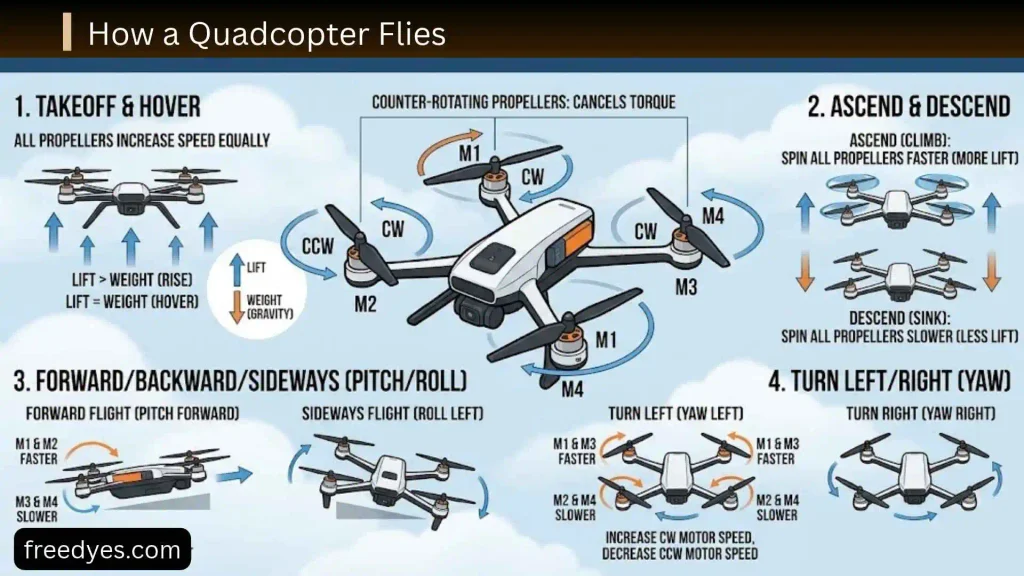
Understanding the basic flight system will make the rest of the build easier to understand.
Thrust
Each motor spins a propeller. The propeller accelerates air downward, producing an upward reaction force called thrust.
When the combined thrust from all four motors is greater than the aircraft’s weight, the drone can climb.
When the total thrust is approximately balanced with its weight, the drone can hover.
When thrust is reduced below the level needed to support the aircraft, it descends.
Roll
Roll tilts the drone to the left or right.
The flight controller changes the relative speeds of the motors to create this movement.
Once the drone tilts, the direction of its total thrust changes, allowing the aircraft to move sideways.
Pitch
Pitch tilts the aircraft forward or backward.
For example, to move forward, the flight controller changes motor output so that the drone develops the required forward tilt.
Yaw
Yaw rotates the aircraft around its vertical axis.
A quadcopter normally uses two motors rotating in one direction and two rotating in the opposite direction. This arrangement allows the aircraft to manage the rotational torque produced by the motors.
Why the Flight Controller Matters
The flight controller constantly processes sensor information and pilot commands, then adjusts motor output.
That means you are not manually controlling each motor.
You move the transmitter sticks, and the flight controller translates those commands into coordinated motor changes.
This is why a small configuration mistake can have a dramatic effect on flight.
DIY Drone Parts List
A reliable build begins with understanding what each component actually does.
Frame
The frame is the physical structure of the drone.
It holds:
- Motors
- Flight controller
- ESC
- Battery
- Receiver
- Optional camera
- Other accessories
For a beginner build, choose a frame that is strong enough to survive ordinary learning crashes without being unnecessarily heavy.
Check the mounting pattern before purchasing electronics.
A frame that does not accommodate your flight-controller or ESC mounting dimensions can turn an otherwise compatible build into a difficult installation.
Motors
The motors convert electrical energy into rotational movement.
For larger quadcopters, brushless motors are commonly used because they can efficiently provide the power needed for larger propellers. Smaller educational drones may instead use small brushed motors or integrated motor-control electronics.
Important motor specifications can include:
- Motor size
- KV rating
- Voltage range
- Current requirements
- Recommended propeller sizes
- Recommended battery configuration
Do not select motors based only on the KV number.
Motor performance depends on the entire propulsion system.
What Does Motor KV Mean?
KV is commonly used as an indication of a motor’s unloaded rotational speed per volt under specified conditions.
It does not mean that a higher KV motor is automatically better.
A motor with a higher KV can be appropriate for one combination of battery and propeller and inappropriate for another.
When selecting a motor, use the manufacturer’s recommended battery and propeller combinations as a starting point rather than guessing from KV alone.
Propellers
Propellers transform motor rotation into thrust.
Their important characteristics include:
- Diameter
- Pitch
- Number of blades
- Rotation direction
- Material
- Weight
The propeller must be appropriate for the motor.
Using a propeller that places excessive load on the motor can increase current demand and heat.
Electronic Speed Controllers
An ESC controls the electrical power delivered to a motor.
A quadcopter normally needs one motor-control channel per motor.
You may encounter:
- Four separate ESCs
- A 4-in-1 ESC containing four ESC channels on one board
A 4-in-1 ESC can simplify wiring and produce a cleaner installation, while individual ESCs can make certain repairs or layouts more flexible.
The ESC must be compatible with:
- Motor requirements
- Battery voltage
- Current demand
- Flight-controller communication
- Physical installation
Flight Controller
The flight controller is the main control computer of the drone.
It receives information from the sensors and radio receiver and sends commands to the motor-control system.
Depending on the board, it may contain an inertial measurement unit with a gyroscope and accelerometer, along with additional sensors or connections.
The flight controller also determines how the drone responds to pilot commands.
Radio Receiver
The receiver is mounted on the aircraft and receives commands from your transmitter.
It provides the flight controller with information such as:
- Throttle
- Roll
- Pitch
- Yaw
- Switch positions
- Other assigned controls
The receiver and transmitter must use compatible communication technology.
Radio Transmitter
The transmitter is the handheld controller.
Before choosing one, consider:
- Receiver compatibility
- Number of channels
- Range appropriate to the intended use
- Ergonomics
- Availability of replacement parts
- Configuration support
Do not select a transmitter without first checking that its receiver technology works with your intended flight controller and receiver.
Battery
The battery supplies energy to the propulsion and electronics system.
Lithium-based batteries are common in many hobby drone applications because of their high energy density, but they must be handled and charged correctly.
Battery selection involves more than capacity.
Consider:
- Voltage
- Cell count
- Capacity
- Discharge capability
- Weight
- Connector
- Physical dimensions
- Compatibility with the motor and ESC system
Battery Charger
Use a charger designed for the exact battery chemistry and configuration you are using.
Do not attempt to charge a lithium battery with a charger that is not designed for it.
Battery safety is part of the drone-building process, not an optional extra.
Wiring and Hardware
A build also requires small items that are easy to forget:
- Wire
- Connectors
- Solder
- Heat-shrink tubing
- Screws
- Nuts
- Standoffs
- Battery strap
- Mounting pads
- Cable ties
- Appropriate electrical protection components
Keep spare hardware and propellers available.
How to Choose Compatible DIY Drone Parts
This is where many first-time builders make their biggest mistake.
The parts should not be selected independently.
Think of the drone as a connected system:
Frame → Motor → Propeller → Battery → ESC → Flight Controller → Receiver
Changing one component can affect several others.
Choose the Frame First
Start with the frame because its physical dimensions influence the rest of the build.
Check:
- Propeller clearance
- Motor mounting
- Flight-controller mounting
- ESC mounting
- Battery space
- Receiver space
- Optional camera space
A larger frame is not automatically better.
A beginner usually benefits from a manageable design that leaves enough room to work on the electronics.
Match the Motors to the Propellers
Motor manufacturers commonly provide recommended propeller combinations.
Use those recommendations whenever possible.
Avoid choosing a motor first and then attaching whatever propeller happens to fit.
The motor has to produce enough thrust for the aircraft while operating within reasonable electrical and thermal limits.
Match the Battery to the Motors
Battery voltage has a direct relationship with motor operation.
For example, a motor intended for a particular voltage range should not simply be connected to a substantially different battery because the connector happens to fit.
Also consider capacity.
A higher-capacity battery can provide more energy, but it usually adds weight.
That means the largest battery is not necessarily the battery that produces the longest useful flight.
Match the ESC to the Motor
The ESC needs to support the motor’s electrical requirements and the battery voltage.
A suitable current margin is important.
Do not select an ESC solely because it is inexpensive or physically small.
Check the specifications for your particular motor, propeller, and battery combination.
Match the Flight Controller to the System
Before buying a flight controller, verify:
- Firmware support
- ESC communication compatibility
- Receiver compatibility
- Mounting dimensions
- Available ports
- Required voltage
- Sensor availability
- Software support
A board that technically fits the frame may still be inconvenient if it lacks the connections your build needs.
Think About Total Weight
The aircraft’s final weight includes much more than the frame.
Add together:
Frame + motors + ESC + flight controller + receiver + wiring + battery + accessories + payload
If you later add a camera or GPS, the weight increases again.
Weight matters because the propulsion system has to produce enough thrust to lift the entire aircraft.
DIY Drone Wiring Explained
Understanding the wiring architecture is much more useful than memorizing one diagram for one particular board.
Battery to Power System
The battery supplies the main electrical energy.
On many builds, battery power reaches the ESC system or power-distribution circuitry.
The exact pads and wiring arrangement depend on the hardware.
Always follow the wiring diagram for your exact boards.
ESC to Motors
Each motor is controlled by an ESC channel.
The ESC converts electrical power into the appropriate motor drive signals.
If motor connections are mixed up, the flight controller may command one motor while a different motor responds.
That can cause severe instability.
Flight Controller to ESC
The flight controller sends motor commands to the ESC system.
The connection may use a supported digital communication protocol or another interface depending on the hardware.
The exact protocol and wiring should match the documentation for the selected components.
Receiver to Flight Controller
The receiver sends radio-control information to the flight controller.
Once connected, you configure the receiver and channel mapping in the flight-control software.
The important point is that the receiver should not simply be connected based on wire color.
Verify:
- Power
- Ground
- Signal
- Correct port
- Correct communication protocol
Optional Camera and Video System
A camera and video transmitter are not required for a basic drone.
They are additional systems that can be installed when the frame, power system, and flight controller can accommodate them.
Adding accessories also adds weight and power consumption.
Tools You Need for a DIY Drone
You do not need a professional workshop, but a few tools make the project considerably easier.
Essential Tools
Useful tools include:
- Temperature-controlled soldering iron
- Solder
- Flux where appropriate
- Small screwdrivers
- Hex drivers
- Wire cutters
- Wire strippers
- Tweezers
- Heat-shrink tubing
- Multimeter
- Small pliers
- Cable ties
Why a Multimeter Is Important
A multimeter can help identify obvious electrical problems before the battery is connected.
It can be useful for checking continuity and verifying certain connections.
Never perform electrical measurements in a way that creates a short circuit, and do not use a continuity function on an energized circuit.
Soldering Practice
If you have never soldered before, practice on inexpensive electronic components before soldering the main power connections of your drone.
A poor joint can create:
- Intermittent power
- Excess resistance
- Heat
- Unexpected shutdowns
- Component damage
Good soldering is not about making the joint look beautiful. It is about creating a mechanically secure and electrically reliable connection.
How to Build a DIY Quadcopter Step by Step
The exact assembly varies by hardware, but the following sequence gives beginners a logical workflow.
Step 1: Make a Complete Parts List
Before assembling anything, place all components on your work surface.
Confirm that you have:
- Frame
- Four motors
- Propellers
- ESC system
- Flight controller
- Receiver
- Transmitter
- Battery
- Charger
- Wiring
- Hardware
- Tools
Then check compatibility.
Do not begin soldering simply because all the packages have arrived.
Step 2: Assemble the Frame
Build the frame according to its manufacturer’s instructions.
Make sure the arms are secure and the structure is not twisted.
Check that:
- Motor mounting holes align
- Electronics mounting holes are accessible
- Battery placement is practical
- Wires will have safe routing paths
Step 3: Install the Motors
Mount one motor on each arm.
Keep the motor wires away from the propeller path.
Do not install propellers yet.
Leave enough wire length to make a clean connection without creating large loops of loose cable.
Step 4: Mount the ESC System
If using a 4-in-1 ESC, mount it in the intended electronics stack.
If using individual ESCs, position them where they can safely connect to the motors and power system.
Keep the wiring organized.
Step 5: Install the Flight Controller
Mount the flight controller securely and in the correct orientation.
If the board’s arrow or orientation marking does not point toward the front of the aircraft, the orientation must be configured correctly in software.
A physically reversed flight controller can work, but only if the software is configured accordingly.
Step 6: Connect the Power System
Connect the battery power wiring according to the documentation for the ESC or power-distribution system.
This is one of the most important soldering stages because the main battery connection carries substantial current.
Inspect the solder joints carefully.
Step 7: Connect the Motors
Connect each motor to its corresponding ESC channel.
The exact motor order depends on the flight-controller configuration.
Do not assume that the physical motor position automatically corresponds to the software’s expected motor number.
Step 8: Connect the Flight Controller and ESC
Use the correct cable or soldered connections specified for your hardware.
Check:
- Power
- Ground
- Signal
- Communication interface
- Connector orientation
Do not force a connector into a socket.
Step 9: Connect the Receiver
Install the receiver where its antenna or antennas can be positioned safely and away from obvious sources of mechanical damage.
Connect it to the appropriate flight-controller port.
Then verify the receiver protocol in software.
Step 10: Secure the Wiring
Before closing the build, inspect every wire.
Make sure:
- No wire touches a propeller
- No solder joint is under unnecessary mechanical stress
- No bare conductor can contact another conductor
- Antennas are protected
- Battery wiring cannot move into the propeller path
Clean wiring is not just about appearance.
It reduces the chance of damage during crashes and makes future repairs easier.
Step 11: Perform an Electrical Inspection
Before connecting the battery, inspect the entire build.
Look for:
- Solder bridges
- Reversed polarity
- Loose wires
- Exposed conductors
- Incorrect connectors
- Damaged insulation
- Loose screws
- Metal debris
Use a multimeter where appropriate to help identify obvious problems.
Step 12: Configure the Flight Controller
Connect the flight controller to the appropriate configuration software.
The exact software depends on the flight controller and firmware.
Many modern hobby quadcopters use firmware such as Betaflight, while educational and other specialized platforms can use different systems. Current build guides commonly include firmware setup as a major part of the build rather than treating the drone as purely hardware.
Step 13: Set the Board Orientation
Confirm that the software knows which direction the flight controller faces.
Move the physical drone by hand and watch the software’s 3D model or sensor display where available.
If you tilt the real aircraft forward, the software should represent the same movement.
If the response is reversed, correct the configuration before proceeding.
Step 14: Configure the Receiver
Turn on the transmitter and connect the drone’s receiver.
Verify that the correct channels move in the configuration software.
Check:
- Throttle
- Roll
- Pitch
- Yaw
Then verify any switches you intend to use.
Step 15: Configure Arming
Choose an appropriate control for arming if your system uses a dedicated arm switch.
Understand the difference between an arm command and simply increasing throttle.
Do not rely on an unfamiliar configuration without testing it carefully.
Step 16: Configure Failsafe
Failsafe defines what happens when the aircraft loses its control link.
This is an important safety function.
Follow the documentation for your radio system and flight controller and test the configuration in a controlled environment before flight.
Step 17: Test Motor Order Without Propellers
Remove every propeller before testing the motors.
Use the configuration software to identify each motor output.
Confirm that:
- Motor 1 controls the expected physical motor
- Motor 2 controls the expected physical motor
- Motor 3 controls the expected physical motor
- Motor 4 controls the expected physical motor
If the wrong motor responds, fix the mapping before continuing.
Step 18: Check Motor Direction
With propellers removed, verify that each motor rotates in the direction required by your flight-controller configuration.
If a motor rotates the wrong way, correct it using the supported ESC configuration method.
Do not improvise electrical changes when you are uncertain about the hardware.
Step 19: Install the Propellers
Only install propellers after motor order and direction have been verified.
Check the markings and orientation carefully.
Two propellers normally rotate in one direction and two in the opposite direction.
A single incorrectly installed propeller can make a properly functioning quadcopter flip or fail to produce stable flight.
Step 20: Secure the Battery
Mount the battery firmly.
It should not be able to slide around during flight.
At the same time, avoid crushing or damaging the battery.
The battery’s position can affect the aircraft’s balance, so aim for a stable center of gravity.
How to Configure a DIY Drone Before Its First Flight
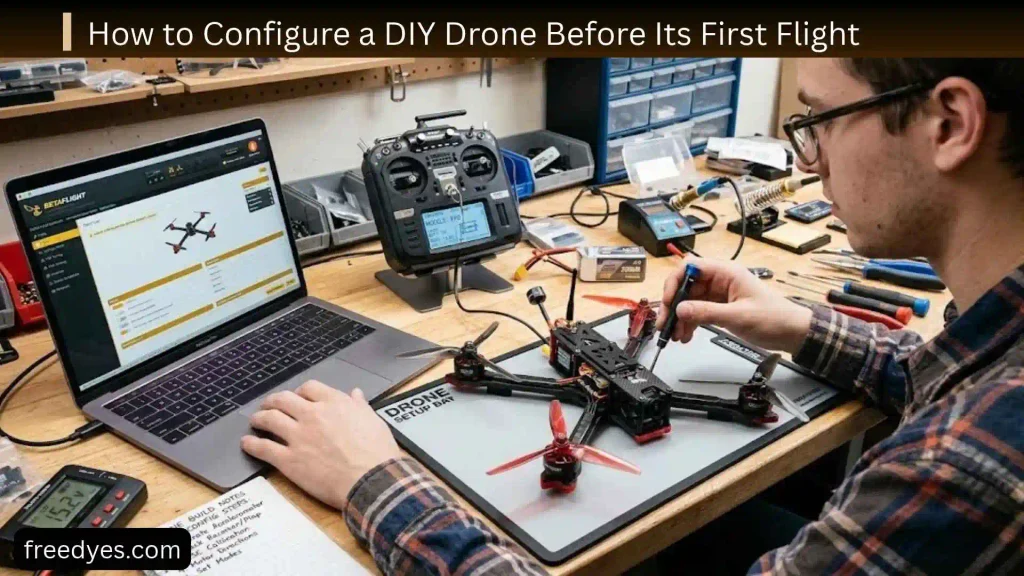
The software stage deserves as much attention as the physical build.
Check the Flight Controller
Verify:
- Correct firmware
- Correct board target
- Correct orientation
- Sensors functioning
- Receiver communicating
- Motor outputs available
Check the Radio Controls
Move each transmitter stick slowly.
The software should show the correct channel response.
For example, moving the pitch control should not produce a yaw response.
Check the Arm Switch
Confirm that the arm switch changes to the expected state.
Do not assume that the switch works simply because it appears in the channel display.
Check Failsafe
Verify the configured behavior according to your system’s instructions.
A control-link failure should not result in an unpredictable response.
Check Motor Mapping
Test every motor separately with propellers removed.
This catches one of the most dangerous configuration mistakes before flight.
Check Motor Direction
Verify every motor again after making any configuration changes.
Do not skip this step simply because you tested it earlier.
First Flight: A Safe Beginner Procedure
The first flight is not the time to test maximum speed.
Your goal is simply to confirm that the drone can take off, hover, respond correctly, and land safely.
Choose the Flying Area
Choose an appropriate area that provides enough space for the aircraft and keeps people, pets, vehicles, buildings, and other hazards away from the flight path.
Before flying outdoors, check the rules that apply in your location.
Drone requirements can vary according to aircraft type, weight, location, and intended operation.
Perform a Pre-Flight Check
Before arming, check:
- Propellers
- Motor mounts
- Frame
- Battery
- Battery connector
- Receiver
- Antennas
- Wiring
- Flight-controller orientation
- Motor directions
- Radio connection
- Failsafe
- Arm control
Make the First Takeoff Small
Increase throttle gradually.
Do not immediately climb high.
A short, controlled hover gives you a chance to notice problems while the aircraft remains relatively close to the ground.
Watch for Abnormal Behavior
Immediately pay attention to:
- Sudden flipping
- Strong drifting
- Severe vibration
- Unexpected yaw
- Strange motor noise
- Excessive heat
- Unusual electrical smell
- Loss of control
If anything seems wrong, land rather than trying to “fly through” the problem.
Inspect the Drone After Landing
After the first flight, inspect:
- Motors
- Propellers
- Frame
- Battery
- Battery connector
- Screws
- Wiring
Touch motors cautiously after shutdown to check for abnormal heat, without placing yourself near moving components.
DIY Drone Troubleshooting Guide
A good troubleshooting process is systematic.
Do not change five settings at once because you will not know which change fixed or created the problem.
The Drone Will Not Power On
Check the problem in this order:
- Battery charge
- Battery connector
- Main power wiring
- Power-distribution system
- Visible damage
- Solder joints
- Flight-controller power indication
If you smell burning electronics or see smoke, disconnect power immediately and investigate before applying power again.
The Drone Powers On but Will Not Arm
Possible causes include:
- Receiver not connected
- Incorrect channel mapping
- Arm switch not configured
- Failsafe state
- Configuration warning
- Battery problem
- Sensor or software issue
Look at the flight-controller software for the specific arming warning rather than repeatedly moving the arm switch.
One Motor Does Not Spin
Start with the simplest checks:
- Is the correct motor channel selected?
- Is the motor physically connected?
- Is the ESC powered?
- Does another motor work from the same output?
- Is the motor damaged?
- Is the ESC damaged?
Never diagnose motor problems with propellers installed.
The Drone Flips Immediately
An immediate flip is one of the most recognizable signs of a configuration problem.
Check:
- Propeller orientation
- Motor order
- Motor direction
- Flight-controller orientation
- Motor mapping
- Configuration settings
Do not keep attempting takeoff until these items have been checked.
The Drone Vibrates
Potential causes include:
- Damaged propeller
- Bent motor shaft
- Loose motor
- Loose frame
- Poor flight-controller mounting
- Damaged motor
- Mechanical imbalance
Start with physical inspection before changing software tuning.
The Drone Drifts
Some drift can result from sensor calibration or configuration.
Check:
- Flight-controller orientation
- Sensor calibration where applicable
- Frame alignment
- Motor condition
- Propellers
- Weight distribution
A badly damaged frame can also affect stability.
The Motors Get Hot
Motor temperature can increase because of excessive load or a mechanical/electrical problem.
Possible causes include:
- Propeller too demanding for the motor
- Excessive aircraft weight
- Damaged motor
- Mechanical friction
- Incorrect power-system combination
- Electrical fault
Do not continue flying an aircraft with motors that become abnormally hot.
Land, disconnect the battery, allow the system to cool, and investigate.
The Drone Loses Radio Control
Possible causes include:
- Receiver problem
- Transmitter problem
- Antenna damage
- Incorrect configuration
- Power issue
- Radio interference
Verify the radio system and failsafe before flying again.
What to Check After a DIY Drone Crash
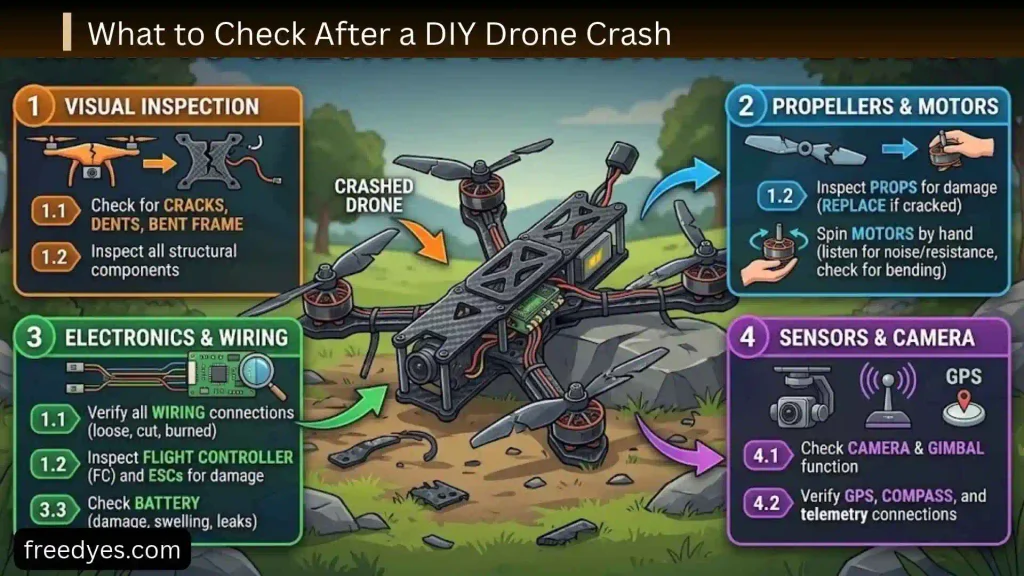
Crashes are part of learning, but a crash should never automatically be followed by another flight.
Inspect the Propellers
Look for:
- Cracks
- Chips
- Bends
- Deep scratches
- Deformation
Replace damaged propellers rather than trying to make them work.
Inspect the Motors
Check whether the motor:
- Spins freely by hand
- Makes unusual sounds
- Has visible damage
- Is loose on the frame
- Has damaged wires
Inspect the Frame
Look carefully at:
- Arms
- Motor mounts
- Plates
- Screws
- Standoffs
A small crack can become a larger structural failure during the next flight.
Inspect the Electronics
Look for:
- Loose wires
- Broken solder joints
- Damaged connectors
- Displaced flight controller
- Damaged antennas
- Exposed conductors
Inspect the Battery
A battery that has been crushed, punctured, swollen, or otherwise visibly damaged should not simply be returned to service.
Battery damage deserves more caution than a broken propeller.
How Much Does a DIY Drone Cost?
The cost varies considerably depending on the type of aircraft and whether you already own the necessary tools.
Basic Educational Build
A small educational build may use:
- Small motors
- Small propellers
- A compact frame
- Integrated electronics
- Small battery
- Simple radio system
Current DIY kits can package many of these components together, which can simplify the learning process.
Custom Hobby Build
A more advanced build may require separate:
- Frame
- Motors
- ESC
- Flight controller
- Receiver
- Radio transmitter
- Batteries
- Charger
- Spare propellers
- Tools
The initial cost is therefore not simply the price of the four motors and frame.
Hidden Costs Beginners Forget
Remember to budget for:
- Soldering equipment
- Multimeter
- Spare propellers
- Spare screws
- Wire
- Connectors
- Heat-shrink tubing
- Additional batteries
- Battery charger
- Replacement motors after crashes
Buying every tool from scratch can make a DIY project more expensive initially than purchasing a ready-to-fly drone.
Different Types of DIY Drone Projects
Not every DIY drone project has the same purpose.
Beginner Quadcopter
Best for learning:
- Assembly
- Motors
- Propellers
- Radio control
- Flight-controller configuration
This is the recommended starting point for most new builders.
FPV Drone
An FPV build adds a camera and video transmission system so the pilot can receive a live view from the aircraft.
This adds additional hardware, configuration, weight, and safety considerations.
Camera Drone
A camera-oriented drone needs enough stability and payload capacity for the intended camera.
The camera itself adds weight, which changes the requirements of the propulsion system.
Educational Drone
Educational builds can focus more heavily on:
- Programming
- Sensors
- Microcontrollers
- Robotics
- Control algorithms
These projects can be especially useful for students and electronics learners.
Autonomous Drone
Autonomous projects are significantly more complex.
They may involve:
- Navigation
- Position estimation
- GPS
- Sensors
- Software
- Mission planning
- Additional safety systems
An autonomous drone should not be treated as simply a larger version of a beginner quadcopter.
Can You Build a DIY Drone With Arduino?
Yes, Arduino-class microcontrollers can be used in educational drone projects, especially when the goal is learning about sensors, control systems, and programming.
However, building a flight controller yourself is much more involved than simply connecting four motors to an Arduino.
You would need to address:
- Sensor readings
- Motor control
- Stabilization
- Timing
- Radio input
- Control algorithms
- Power management
For a first flying project, using a purpose-built supported flight controller can allow you to concentrate on assembly and configuration before attempting your own control system.
Can You Make a Drone From Household Materials?
You can experiment with homemade frame materials for educational projects, but the aircraft’s propulsion and electrical systems still need suitable components.
A homemade frame should be:
- Rigid
- Symmetrical
- Strong enough for the expected loads
- Light enough for the propulsion system
- Designed with safe motor mounting
Avoid treating improvised materials as a substitute for proper electrical or battery components.
The frame can be experimental.
The safety-critical electrical system should not be improvised casually.
Can You Reuse Parts From an Old Drone?
Sometimes, but compatibility must be checked.
Potentially reusable components include:
- Motors
- Propellers
- Frame
- Receiver
- Flight controller
- Battery
- ESC
Before transferring anything, check its voltage, physical dimensions, connectors, firmware support, and electrical requirements.
A component being physically compatible does not necessarily mean it is electrically compatible.
How Long Does a DIY Drone Fly?
There is no universal flight-time number for DIY drones.
Flight time depends on:
- Battery capacity
- Battery weight
- Aircraft weight
- Motor efficiency
- Propeller choice
- Flight style
- Wind
- Payload
- Power-system efficiency
A larger battery can increase available energy, but its additional weight can reduce efficiency.
That is why battery selection should be treated as a balance rather than simply choosing the largest capacity available.
How to Make a DIY Drone More Reliable
Once the drone flies, reliability becomes the next goal.
Keep the Wiring Organized
Secure wires away from moving parts.
Leave enough flexibility for normal movement without creating loops that can reach a propeller.
Replace Damaged Propellers
Propellers are relatively easy to replace compared with motors or electronics.
Do not continue flying with visibly damaged blades.
Check Screws Regularly
Vibration can loosen mechanical hardware over time.
Periodically inspect:
- Motor screws
- Frame screws
- Standoffs
- Battery mounts
Keep a Configuration Backup
If your flight-controller software allows configuration backup, keep a copy of your working settings.
This can save time if you need to replace the flight controller or reset the configuration.
Keep Spare Parts
A small supply of:
- Propellers
- Screws
- Wire
- Connectors
- Heat-shrink
- Replacement hardware
can make repairs much easier.
Common DIY Drone Mistakes to Avoid
Choosing Parts One at a Time Without Checking Compatibility
This is perhaps the most expensive beginner mistake.
A cheap motor is not a bargain if it requires a different battery, propeller, or ESC than the rest of your system.
Choosing a Battery Only by Capacity
More mAh does not automatically mean longer flight.
The extra battery weight can reduce the benefit.
Choosing Motors Only by KV
KV is only one specification.
Propeller size, battery voltage, motor design, aircraft weight, and intended flight style all matter.
Installing Propellers During Bench Testing
Keep the propellers off while configuring and troubleshooting.
This is one of the simplest ways to reduce the risk of injury.
Skipping Motor Direction Testing
Never assume the motors rotate correctly.
Test them.
Ignoring the Flight Controller’s Orientation
A flight controller that is mounted differently from its configured orientation can cause severe control problems.
Testing Too Many Changes at Once
If the drone has a problem, change one relevant variable at a time.
That makes troubleshooting much easier.
Ignoring Physical Damage
Do not assume every flight problem is caused by software.
A cracked frame, damaged propeller, loose motor, or bent shaft can create serious instability.
DIY Drone Pre-Flight Checklist
Use this checklist before every flight, not only the first one.
Mechanical Check
- Frame is intact
- Motors are secure
- Propellers are undamaged
- Screws are tight
- Battery is securely mounted
- Wiring is clear of propellers
Electrical Check
- Battery is appropriate
- Connectors are secure
- No exposed conductors are visible
- No obvious damage is present
- Electronics are mounted securely
Control Check
- Transmitter is functioning
- Receiver is connected
- Controls respond correctly
- Arm control works as expected
- Failsafe has been configured appropriately
Flight Check
- Motor directions are correct
- Propeller orientation is correct
- Flying area is suitable
- Local rules have been checked
- People and animals are clear of the operating area
DIY Drone Safety Tips
A DIY drone combines spinning machinery, electrical power, batteries, and radio-controlled movement.
Treat the project accordingly.
Keep Propellers Off During Bench Work
Remove propellers whenever you are:
- Configuring the flight controller
- Testing motor outputs
- Checking radio channels
- Troubleshooting
- Changing motor mapping
- Working on wiring
This is one of the most important safety habits for a new builder.
Handle Batteries Carefully
Use the correct charger for the battery.
Do not use a visibly damaged or swollen battery.
Do not short battery terminals.
Do not leave battery charging unattended.
Follow the battery manufacturer’s handling and storage instructions.
Protect Yourself While Soldering
Use a stable work surface and appropriate ventilation.
Keep the soldering iron away from wires and batteries that could be damaged by heat.
Fly Responsibly
Rules vary depending on the country and location.
Before outdoor operation, check applicable requirements involving:
- Registration
- Airspace
- Weight categories
- Pilot requirements
- Privacy
- Operating locations
- Restrictions around people and sensitive areas
Do not assume that a homemade or lightweight drone is automatically exempt from local rules.
DIY Drone FAQ
What Parts Do I Need to Build a DIY Drone?
A basic quadcopter requires a frame, four motors, propellers, an ESC system, a flight controller, receiver, transmitter, battery, charger, wiring, and mounting hardware.
Additional components such as cameras, GPS, or video transmitters are optional.
What Is the Best DIY Drone for Beginners?
A small or moderate-size quadcopter with compatible, well-documented components is usually a better starting point than a high-performance racing or long-range build.
The goal of the first project should be understanding the system and learning to troubleshoot it.
Can I Build a Drone Without Coding?
Yes.
Many beginner drone builds can use existing flight-controller firmware and configuration software without requiring you to write the flight-control code yourself.
Coding becomes more relevant when you want to create custom control systems or autonomous functions.
Can I Build a Drone Without Soldering?
Some kits use connectors that reduce the amount of soldering required.
However, many custom drone builds involve soldering, particularly around power and electronics.
If you are new to soldering, practice first rather than learning directly on expensive components.
Why Does My DIY Drone Flip Immediately?
An immediate flip can result from incorrect propeller orientation, wrong motor direction, incorrect motor mapping, incorrect flight-controller orientation, or another configuration problem.
Remove the propellers and verify the system step by step before attempting another takeoff.
Why Won’t My DIY Drone Arm?
Check the receiver, radio channels, arm switch, failsafe, battery, sensor status, and any warning shown by the flight-controller software.
The exact cause depends on the hardware and firmware.
How Do I Choose Drone Motors?
Start with the intended frame and propeller size, then compare motor specifications and manufacturer recommendations for battery voltage and propellers.
Do not choose motors based solely on KV.
What Battery Should I Use for a DIY Drone?
Use a battery whose voltage, capacity, discharge capability, connector, dimensions, and weight are appropriate for your complete propulsion system.
The correct battery is a system-level decision, not simply the largest battery that fits physically.
Why Is My DIY Drone Vibrating?
Check the propellers, motors, motor mounts, frame, screws, and flight-controller mounting.
Mechanical problems should be investigated before changing flight software settings.
Why Are My Drone Motors Getting Hot?
Excessive heat can result from excessive motor load, unsuitable propellers, excessive aircraft weight, mechanical problems, or an incompatible electrical setup.
Land the drone and investigate rather than continuing to fly.
How Long Does a DIY Drone Battery Last?
Flight time depends on the battery, total aircraft weight, propulsion system, propellers, flight style, wind, and payload.
There is no single flight-time figure that applies to every DIY drone.
Can I Add GPS to a DIY Drone?
Yes, if the flight controller and software support it and the aircraft has the necessary hardware and power capacity.
GPS should be considered an upgrade rather than a requirement for a basic beginner quadcopter.
Can I Add a Camera to a DIY Drone?
Yes.
However, the camera, mounting system, and associated electronics add weight and may change the drone’s power requirements and flight characteristics.
Is a DIY Drone Cheaper Than a Ready-Made Drone?
Not necessarily.
DIY can be economical when you already own tools or can reuse compatible parts, but buying every component, tool, battery, charger, and replacement part can make the initial project more expensive.
Is It Legal to Build and Fly a DIY Drone?
Building and flying are separate questions.
Local regulations can apply to the operation of a drone even when you built the aircraft yourself.
Check the current rules that apply to your location before outdoor flight.
Final DIY Drone Build Checklist
Before considering the project complete, verify all of the following:
- The frame is secure.
- All four motors are mounted correctly.
- The propellers are appropriate for the motors.
- The ESC system is compatible with the motors and battery.
- The flight controller is compatible with the rest of the system.
- The flight controller orientation is correct.
- The receiver communicates with the flight controller.
- The radio channels are mapped correctly.
- The arm control works correctly.
- Failsafe behavior has been configured appropriately.
- Motor order has been verified.
- Motor direction has been verified.
- All motor tests were performed without propellers installed.
- Propellers are installed in the correct orientation.
- The battery is secure and undamaged.
- Wiring is clear of moving parts.
- The frame and motors have been inspected.
- The intended flying area is appropriate.
- Applicable local requirements have been checked.
If any important item is uncertain, do not take off yet.
Conclusion
A successful DIY drone build is not simply a matter of attaching four motors to a frame. The aircraft works because several systems have been selected to work together: the frame supports the hardware, the motors and propellers create thrust, the ESCs control the motors, the battery supplies energy, the receiver delivers pilot commands, and the flight controller coordinates the entire aircraft.
For beginners, the smartest approach is to build a simple, compatible quadcopter rather than starting with the fastest or most complicated design. Pay particular attention to motor and propeller matching, battery selection, ESC compatibility, wiring, flight-controller orientation, motor mapping, and failsafe configuration.
The most important lesson is to test systematically. Keep the propellers off during bench testing, verify every motor individually, inspect the electrical system before applying power, and treat the first flight as a controlled test rather than a performance demonstration.
Once your first drone flies successfully, you can build on that knowledge. You can experiment with better frames, different propulsion systems, FPV equipment, cameras, GPS, programming, or eventually even your own flight-control systems.
The real value of a DIY drone is not simply getting an aircraft into the air. It is understanding why it flies, how its components interact, how to diagnose failures, and how to improve the design safely.